woensdag 3 oktober 2012
Atlas Water Tower Kit

I purchased an HO Atlas Water Tower kit quite a while back, even though I originally had no intention of using it on my layout. This was mostly because my layout wasn�t going to be set in the steam-era, and lack of space on my layout. However, now that most of my structures are situated on my layout, I decided that that maybe I could make room for it after all. And as for it being from the steam era, well that hardly mattered as there are still many original water towers standing today, some still even currently being used. The water tower will stand in front of the turntable, directly to the left of the signal tower, and will service directly on the main line track.

The first step was to paint the components that made up the main structure. The Atlas Water Tower kit shows the completed model painted with a light green tank, however I opted for a more generic look by painting the entire structure brown. I started by spraying each piece with Camouflage Brown Krylon paint, then letting them dry for 48 hours. The brown base coat was quite dark, so I mixed several washes of brown enamel at different shades, and randomly painted different pieces of the superstructure with the different shades of brown. These slight colour variations add a more realistic, natural look to the overall wood structure. The same process was also used on the vertical planks that make up the main water tank.

Assembling the pieces was quite straight forward, and all the pieces fit snugly together. I needed to scrape off paint on every joint of the tank�s support structure to ensure the pieces slid completely into each other. For the roof, I first painted it flat black, then dry brushed it with satin aluminum enamel paint. I finished it with orange powdered pastels to represent the presence of rust. Once the entire structure was together, I weathered it with various powdered pastels and sealed everything with 2 coats of Testor�s dull-coat.

A final detail that isn�t included in the kit, but is highly recommended, is the chains and counter-weights that support and raise/lower the water spout. You can represent these with black thread; however chain link has the most prototypical look. I found some small chain link in the jewelry clearance section at Walmart, which I then cut to length and painted black before installing it onto the model. Even though the chain is a bit larger than a prototypical sized chain, the look is quite convincing. Now that the model is complete and installed on the layout, I�m definitely happy that I decided to use it.

maandag 10 september 2012
Layout Scenery Part III - Downtown

Constructing the main town site of my layout was my next major scenery project. It consists of my Walther�s Merchant�s Row II, DPM Other Corner Caf�, and Kate�s Colonial Home kits; all set around the circular main street, with my Walther�s White Castle Restaurant kit overlooking the scene from up the street. The amount of actual buildings is quite limited due to the terrain and size limitations of my layout, but the few buildings I do have for my town scene do give a good representation of a full-sized urban town. It was also this space limitation that determined the town�s circular layout.
The town site sits on an area that I had previously allocated for a small pond, but I decided early into my layout�s construction that building a town site would be a better utilization of the space. The pond will just have to wait for another layout. I had also already previously planned the overall layout of the town site, including the street, sidewalk, and building locations, so all I needed to do at this point was start laying down scenery.


I had previously used Woodland Scenics Smooth-it to create a large, flat area to which the town would sit upon. After sanding and painting the entire area the same gray colour as my roads, I made paper templates which represented the footprint of each building. The templates helped me ensure each building would have a good fit around the small, circular roadway, as well as the overal downtown plan. The painted and weathered styrene sidewalk I had built was also glued down at this point using construction adhesive.


Blended turf was next. This would represent the green spaces between the buildings, as well as the yard of the house. The turf in the yard of the house was applied a bit greener then the rest of the town�s green space to represent better upkeep and maintenance. I used an Atlas White Picket Fence kit to border the yard of the house, and an Atlas Hairpin style fence kit to fence in the backs of each green space from the tracks behind the buildings. I used superglue to fasten the fences to the layout.


My Walther�s White Castle Restaurant kit is located just up the road from the downtown area, situated at the corner of one of the two t-intersections on my layout. I decided to have a gravel parking lot for the restaurant, so I started by lying down and leveling sifted dirt, and cementing it down with isopropyl alcohol and thinned white glue, applied gently with a small pipette. After drying for a day, I applied blended turf to define the median between the shoulder of the road and the parking lot. I used a paper mask to prevent the turf from drifting onto the main parking lot (as seen above, bottom right).


Finding model chain link fences in my area was proving to be difficult, so I turned to the internet to see if I could make my own. After finding several helpful articles, I easily made my own simple fences using brass rods and tulle I purchased at a local fabric store. I started by drawing a scale 6� tall chain link fence template on a small scrap piece of wood. I then cut .81mm brass rod into the required lengths of each fence post, and taped them directly over the template with masking tape. A full 12� brass rod was used as the main rail along the top, and a 12� length of music wire was used as the bottom support rail.


I used my soldering iron to carefully solder the support rails to the posts. A bit of sanding might be required after making the solder joints, as the solder can leave a large, unrealistic joint. The next step was to lay the tulle over the backside of the fence�s frame with superglue. I found that superglue worked the best to attach the tulle material to the brass rod. Once the glue had fully dried, I used flat-head trimmers to gently trim the access tulle from the frame.


Painting the fence was next. For this, I used metallic gray acrylic paint, ensuring all of the brass rod and tulle material was fully coated. After bending the fence to the appropriate angle, I used super glue to fasten it to my layout. I had a little trouble with this particular installation as the terrain wasn�t level, so I had to bend the fence on its horizontal access, which caused the tulle material to bind in some spots. Many of the small defects in the tulle (that were caused from bending the fence), were easily covered and hidden with shrubs that I added after installing the fence.


The center median and sidewalk for my downtown scene were completely built from scratch using bulk styrene. The sidewalk was built to match the existing sidewalk that was included in my Merchant�s Row II kit, so determining sizing and spacing was quite straight forward. I used a dull hobby knife and metal straight edge to etch the concrete expansion joints into the styrene, and painted everything light aircraft gray. The median features a center-raised green space, topped with bushes and a large deciduous tree. I started by gluing the tree to the inside base of the median, and then filled the median with fine sifted dirt. After cementing the dirt in place with thinned white glue, I topped the dirt filler with blended green turf, and various shrubberies.


All of the street lamps were purchased off of eBay, and run off of 12v DC. I did add a 100ohm resistor to each lamp however, as running them at 12 volts seemed a bit too bright. To install the lamp posts, I simply drilled a 1/8� hole into the layout, and ran the street light�s leads through to the underside of my layout. The lamp posts were a bit too loose in the 1/8� holes, so I solved this by wrapping a small piece of electrical tape around the underside of the base that fit into the hole. This made everything nice and snug. All of the buildings were also installed by this point and electrical connections were made for lights to leads that run to the underside of the layout. None of the buildings are fastened to the layout, which makes removal much easier if work is required on any of them in the future.


The final details I added to my downtown scene were accessories from a Walther�s City Accessory kit. I carefully painted each accessory and placed them where necessary along the sidewalks, attaching them with superglue (which came in especially useful when installing the tiny parking meters). The original blue US Postal Service mail boxes were painted red to represent Canada Post mail boxes, and include hand-cut white Canada Post logos.


I obviously still need to add the �final� details to my downtown scene to fully complete it, which would be people and vehicles, but that is something that will be completed in the near future. My town, as well as the streets and the overall railroad, still disappointingly need to be named too, so if you have any good ideas, please send them my way!


woensdag 8 augustus 2012
Traffic Lights - Part II
A note about this post: I do not take any credit for the design of this circuit, not even for my own rendering and modifications of the circuit schematic. I instead turn the spotlight on Rob Paisley and his website, who has without a doubt spent an unimaginable amount of time, effort, and talent developing dozens of model railroad circuits that ultimately make our layouts achieve things we never thought possible. The intent of this post is to only describe my experience of applying and constructing Rob�s designs on my own layout. Please visit Rob�s website (HERE) , which has a wealth of wiring information and useful model railroad circuitry.
-Tyler


![]()


Read More..
-Tyler

If there is one thing that I learned from building my layout thus far, it�s that the most time consuming, frustrating, problematic, and complex projects usually are the ones that are taken for granted, often fading into the background or going unnoticed when combined with all other aspects of the model. And my traffic lights were definitely no exception to this. Now, I�m not exactly saying my traffic lights go unnoticed, (they are definitely a nice feature) but I myself somewhat took for granted the electrical complexity behind making all the lights synchronized, especially because I was building the entire system, from lights to controller, completely by hand. I know commercial controllers are available from $40.00 to $100.00 (or higher), but doing it myself just seemed more appealing.
Last year while searching for methods to synchronize model traffic lights, I came across Rob Paisley�s 20 output sequencing circuit (HERE). Rob had designed a circuit that essentially created 20 separate outputs that progressed one at a time from 1-20 in a continuous loop. When combined with a novel lighting circuit, synchronization of an entire intersection in both directions is accomplished within the 20 output steps, then repeats. I am going to refrain myself from even trying to go into detail on the particulars of this circuit, as Rob Paisley has already explained it in depthon his website. Rob�s site includes detailed diagrams and parts lists, as well as in-depth explanations of how the circuits work. Rob also offers commercially built circuit boards and kits for this and other circuits he�s designed on his website, but nonetheless, I was determined to build it myself.

After placing my parts order with Mouser Electronics (using the parts list off of Rob�s website), I went to work putting together my own wiring schematic for this circuit, as shown above. I made my own schematic for 3 reasons. First was because I wanted a plan of the entire circuit, from the controller right to the lights on the layout. The second reason was to plan the actual layout of the circuit board. I drew the schematic in a way that I could literally plan exactly where every connection and lead would go when building the actual circuit, ensuring that everything was spaced correctly so I didn�t run out of room on my PC board. The third and final reason was to better understand how the circuit itself worked. Even though Rob explains the function and how this circuit works in detail on his website, if you do not have a good understanding of it yourself, then it will be a lot more difficult to construct and even harder to troubleshoot. I am no electronics expert myself, so I spent a lot of time researching each component and IC, finding and reading the datasheet for each one as Rob recommends on his website.


Once all of my components arrived from Mouser, I purchased a 2200-hole PC board from The Source, and eagerly went to work putting it together. I used my schematic almost exclusively to construct the circuit on the PC board, marking off each completed component and section of the circuit with a highlighter to ensure I didn�t get lost or miss a connection, or worse, make a wrong connection. Double, triple, and quadruple checking my work against my schematic as well as Rob�s original wiring schematic almost guaranteed no major errors were made.

I used my soldering iron to make all the connections on the back of the PC board, and used bare steel wire for the leads between connections. Special consideration needs to be made for spacing of connections that pass over each other, which requires the steel lead to pass up through the PC board, over the existing connections below, and then back down through the PC board to its intended location. Care must also be taken when soldering connections that are right beside each other, as it is easy to unintentionally solder two separate connections together. There were also several spots on the PC board where the soldered connections were shorting out on each other because they were so close to each other, so I carefully used a razor blade to �scrape� the space in between each connection, ensuring the connections were no longer touching.

You will probably notice when comparing my schematic to Rob�s schematics that the LED traffic light portion of my circuit utilizes PNP transistors to control the LED lights, whereas Rob�s examples show the LEDs connected directly to the 20 outputs. The reason for this is because the 20 outputs of the circuit are LOW (negative). To control the red, yellow, and green LEDs of the traffic lights, the LEDs need to be supplied with a common positive (+) current, connected to the anode of each LED, and a separate negative (-) �controller� lead connected to the cathode of each LED, and then to each output of the controller. However, I built my traffic lights the opposite way, with a common negative and separate positive controlling wires. Thus, my lights could only be controlled by applying separate POSITVE current connections to each LED, where the 20 output circuit controls the LEDs by separate NEGATIVE current connections to each LED.

To get around this issue, I applied Rob�s wiring schematic where he explains how to use the 20 output circuit to control high-current bulbs by utilizing PNP transistors as switches. In other words, instead of directly controlling the LED lights by having them directly connected to the 20 outputs of the controller, I used the 20 outputs to control the PNP transistors, which act like switches, either allowing or stopping the separate positive, high current (12v) flowing through to the bulbs. The transistor�s switching capability is controlled by its base terminal, which is connected to the 20 outputs of the controller. I then simply replaced the high current bulbs with resistors and my LED traffic lights.


Once the circuit was completed, I needed to make the connections from the controller to 2 � 10 position terminal strips, which I would then later connect each traffic light to. To do this, I first cut a piece of tempered hardboard, to which I attached the 2 terminal strips along the bottom edge. I used �� brass flat-head machine bots applied from the back of the hardboard to fasten the terminal strips, allowing the hardboard base to lay flat. I also installed an additional 4 bolts through the hardboard base to support the circuit board, allowing it to be secured without having its bottom circuitry come in contact with the hardboard base.


The final step was to connect each positive output on the circuit board to the screws on the terminal strips. I used high-quality phone cable to do this, which is convenient because most telephone cable contains a red, green, yellow, and black wire, making it easy to colour-code each terminal based on what colour LED will be connected to it. I have a total of 6 traffic lights on my layout, so a total of 18 separate LEDs, 6 of each colour, and one common negative, so a total of 19 connections. The first 9 connections will control 3 complete traffic lights in a north-south direction, and the following 9 will control the other 3 complete traffic lights in an east-west direction.

After I had attached everything to the hardboard base, I installed the entire module unit under my layout. The circuit requires a 12 volt DC power source, so I connected it to a 12 volt terminal on a previously installed power terminal strip. I had already installed my actual traffic lights on my layout�s intersections, running the wires to the underside of my layout through 1/8� pilot holes. I utilized telephone cord again here to connect the traffic lights to the terminals on the controller module. After connecting each traffic light to its corresponding power terminal on the control module, all that was left was to test it. And just like that, I now had working traffic lights on my layout!

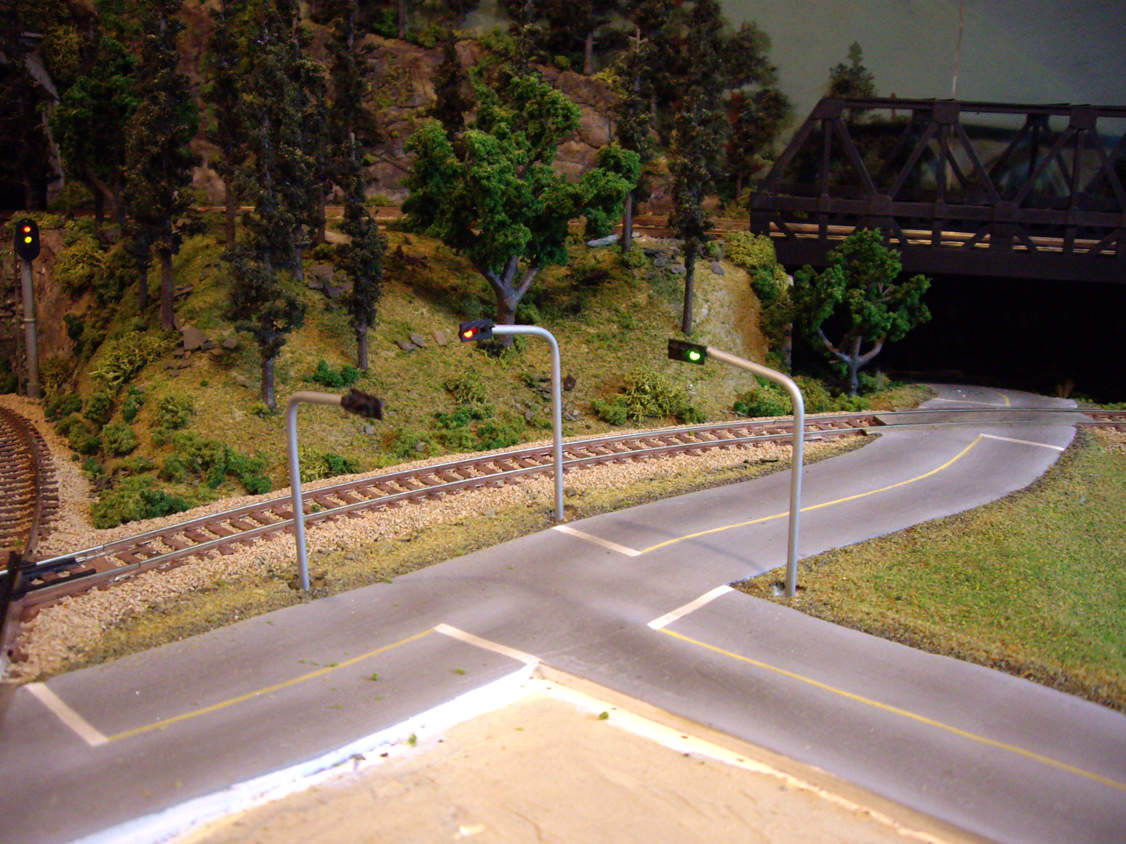
Well, it wasn�t really �just like that.� I spent days and countless hours pulling my hair out for over a week, testing and trying to locate small short circuits that arose over and over again on both the control module and in the traffic light wiring itself. With so many small connections so close to one another, it�s pretty much impossible to get it right 100% the first time. There were nights were I literally had to walk away from the entire project in frustration, but after sleeping it off, I always tackled it the next day with a fresh and positive attitude. In the end, the final result was a working, fully automated, synchronized traffic light system, which I will definitely never take for granted. And to be honest, if others don�t notice it, it�s only because it�s working how it should.
Check out my YouTube video showing my hand-built traffic lights and controller based on Rob Paisley�s 20 Output Sequencing Circuit in action!
Abonneren op:
Posts (Atom)
